

Stop wasting time on boilerplate. Choosing the right UI toolkit is the fastest way to ship high-quality apps. When you build with Tailwind CSS, two names dominate the conversation: shadcn/ui and DaisyUI. But which one unlocks the speed you need?
The choice is not about which is “better” universally. It's about which tool is the perfect fit for your framework, your team, and your design ownership model. We've broken down the architecture, component model, and developer experience to help you pick the winning stack and ship faster.
TD;LR
- shadcn/ui is for React/Next.js teams that need full code ownership, high accessibility (via Radix), and a custom design system. It's a "component collection," not a traditional dependency.
- DaisyUI is for rapid prototyping and framework-agnostic apps (Vue, Svelte, Laravel) that prioritize pure CSS simplicity and instant theming (30+ built-in themes).
- Verdict: If your primary stack is React/Next.js and you need to scale, start with shadcn/ui. For simple, non-React projects, DaisyUI is unbeatable for speed.
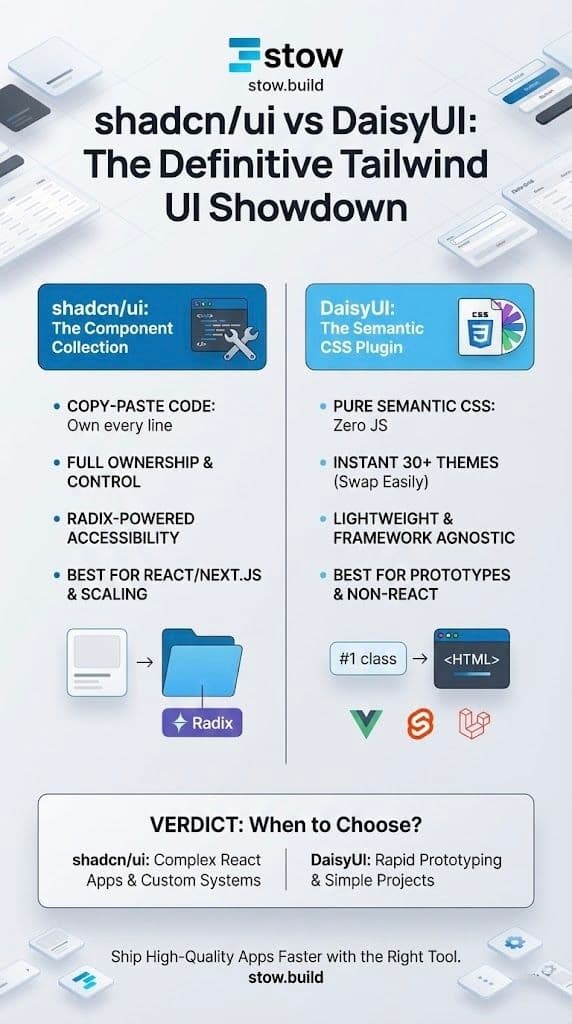
The Architectural Split: Component Collection vs. CSS Plugin
The core difference between shadcn/ui and DaisyUI is architectural. Understanding this distinction defines your maintenance headache—or lack thereof.
shadcn/ui: The Copy-Paste Component Ownership Model
shadcn/ui is not an NPM library. You don't install it as a dependency. Instead, you use a CLI to copy the source code for components (like Button, Dialog, or Tooltip) directly into your project's components directory.
- Full Ownership: You own every line of code. There are no external dependencies or version lock-in for the UI itself.
- Radix Primitives: Component behaviors are powered by Radix UI, ensuring enterprise-grade accessibility(ARIA attributes, keyboard navigation) right out of the box.
- Tailwind Styling: The styling is pure Tailwind CSS utilities, which you can modify instantly in the copied file.
DaisyUI: The Semantic CSS Plugin
DaisyUI is a lightweight Tailwind CSS plugin. It extends Tailwind by adding a layer of semantic, pre-defined class names. Think of it as a modernized, class-based framework like Bootstrap, built on top of Tailwind's utility-first core.
- Pure CSS: It ships zero JavaScript. All styling is managed via classes like
btn-primary,card, orbadge-info. - Instant Theming: It includes 30+ production-ready themes that are easy to swap by changing a Tailwind configuration or a CSS variable.
- Framework Agnostic: Since it’s just CSS, it works effortlessly with vanilla HTML, Laravel/Blade, Vue, Svelte, or any other framework.
Deep Dive: Comparing Ownership, Framework Fit, and Speed
The table below breaks down the key decision points for developers choosing their UI foundation.
| Aspect | shadcn/ui | DaisyUI |
|---|---|---|
| Core Focus | React/Next.js components; Radix-powered functionality. | Semantic CSS classes; instant theming and speed. |
| Customization | Highest—edit the copied source code freely. | Good via CSS variables; limited for complex behavior changes. |
| Accessibility (ARIA) | Excellent (via Radix); essential for complex UIs. | Requires manual JS for complex behavior (e.g., Modals). |
| Installation | CLI setup: npx shadcn-ui add <component>. | Simple npm install; add to tailwind.config.js. |
| Best For | Scalable, production-ready React apps; custom design systems. | Prototypes, full-stack developers, non-React ecosystems. |
| Learning Curve | Moderate for React devs; requires Tailwind knowledge. | Low—familiar, Bootstrap-like classes; instant use. |
Why Developers Choose shadcn/ui for Production Apps
In 2025, shadcn/ui has become the default choice for serious React development. It’s not just about aesthetics; it’s about long-term maintainability and application depth.
1. Ownership and Customization Control
When you copy the code, you gain ultimate control. This is the game changer for building a true, unique design system.
"You own the code... no upgrade blockers."
- No Dependency Risk: You eliminate the fear of a component library making breaking changes.
- True Composition: Components are built from simple primitives, allowing you to compose complex UIs like Lego blocks—a core tenet of modern React.
2. Enterprise-Grade Accessibility (Radix)
Accessibility is non-negotiable for professional applications. shadcn/ui leverages Radix primitives to handle complex UI behaviors correctly, including:
- Keyboard Navigation: Tab stops, arrow keys, and focus management.
- ARIA Attributes: Correctly labeled roles and states for screen readers.
If your application has accessibility requirements and complex component interactions (e.g., command palettes, data tables), shadcn/ui wins hands down.
3. Native React Ecosystem Fit
The whole system feels native within a modern React/Next.js stack. The CLI setup, TypeScript support, and component structure integrate seamlessly with popular tools like Turborepo and Vercel.
- DX is Key: The developer experience is flexible and fast, empowering you to focus on business logic.
Why DaisyUI Still Wins for Prototypes and Non-React Stacks
Despite shadcn's dominance in the React sphere, DaisyUI remains a powerhouse for specific use cases where pure speed and framework flexibility matter most.
1. Zero JavaScript, Total Freedom
DaisyUI’s biggest strength is its simplicity. Because it is a pure CSS plugin, it introduces zero JavaScript overheadand works everywhere.
- Non-React Stacks: Essential for developers using Vue, Svelte, Django, or Laravel (with Blade/Livewire). It's the perfect Tailwind solution when you cannot or will not ship React.
- Lightweight Shipping: The CSS file is small, ensuring your initial load time is minimal.
2. Unmatched Theming Speed
Need to demonstrate a concept with multiple themes instantly? DaisyUI is the tool.
- 30+ Themes: Ready-to-use themes like
dark,retro, orvalentinecan be swapped with a single class change on the<html>tag. - Rapid Prototyping: Designers and back-end developers can style an application in minutes, not hours, allowing for faster feedback loops.
3. Bootstrap Familiarity
For developers coming from Bootstrap, Foundation, or Materialize, the semantic class approach is instantly intuitive: btn-outline-secondary vs. a long string of Tailwind utilities. It lowers the barrier to entry for teams less comfortable with utility-first styling.
Ready to Ship?
The fastest developers don't write boilerplate. They stow high-quality components and build on proven foundations.
shadcn/ui gives you the deep customizability for a unique, scalable React design system. DaisyUI gives you the framework freedom and speed for quick wins and non-JS stacks.
Need a specialized component that neither offers? Don't build it from scratch.
Browse the Verified Stow Components—the online marketplace where developers buy and sell high-quality, verified code across every framework.
Find it. Stow it. Ship it.