

Stop fighting boilerplate. The problem with massive UI libraries is that your app ends up looking like everyone else's. You spend hours customizing themes and swapping out basic component primitives just to make your product feel unique.
That friction ends today with a huge shadcn update.
On December 12, 2025, @shadcn dropped shadcn/create, a foundational shift that moves component ownership from "tweak after install" to "configure on startup." It's a powerful new CLI tool that lets you scaffold a fully custom UI system from commit zero. This isn't just a config update; it's a tool that hands you a bespoke, production-ready design system in minutes.
TL;DR
- Custom Setup: Use
npx shadcn createto scaffold an entire tailored project, not just add single components. - Primitive Flexibility: Swap out the core component library—choose Radix UI or the new Base UI support.
- Five Presets: Select from five new visual styles (Vega, Nova, Maia, Lyra, Mira) to kill "shadcn sameness."
- Deep Theming: Configuration now dictates fonts, spacing scales, and icon sets, auto-generating customized TSX.
- Build Faster: Stop hours of post-setup config. Start with a unique, high-performance UI right away.
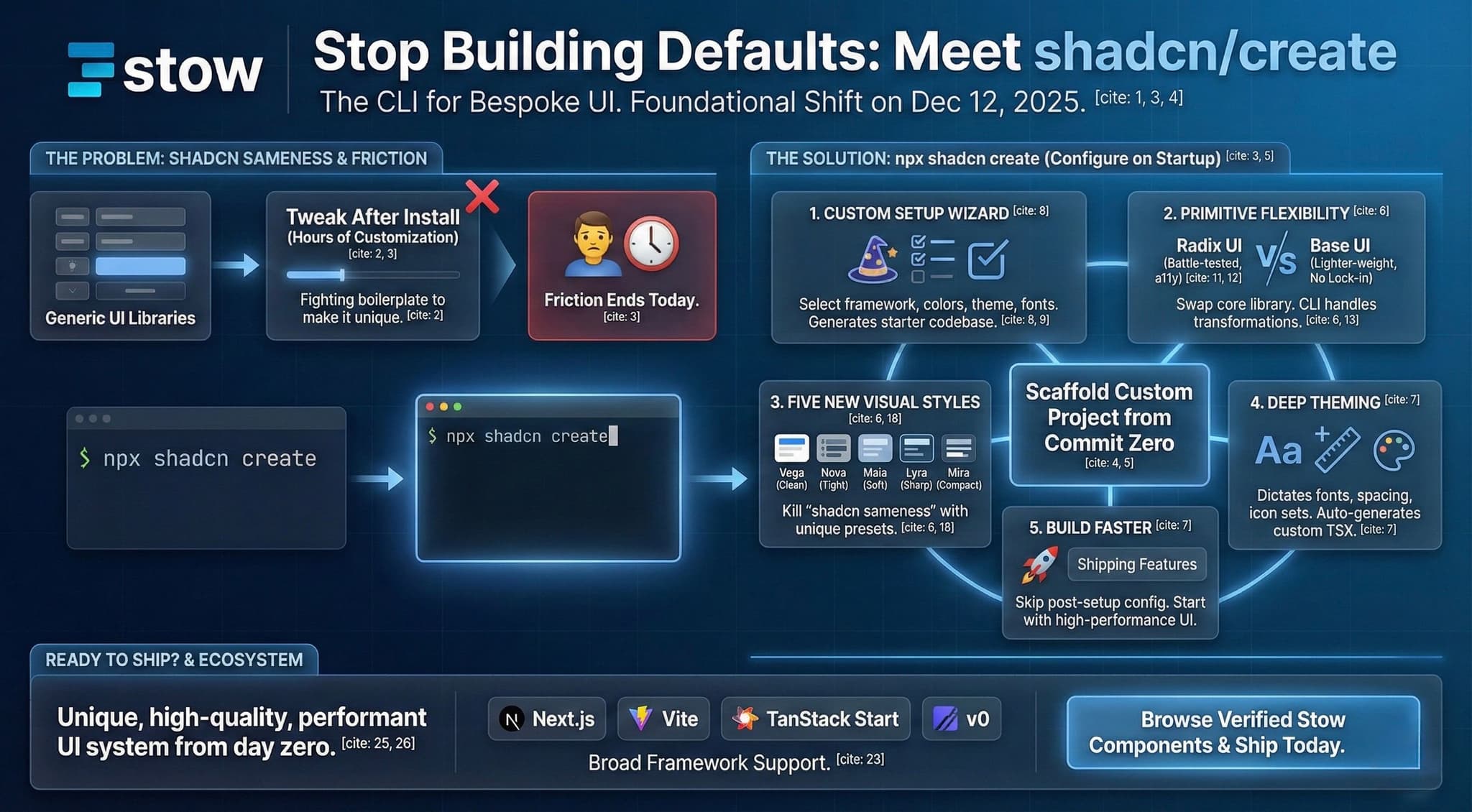
The Custom Setup You Always Needed: npx shadcn create
Before, you ran npx shadcn@latest add and then spent the next hour configuring. It worked, but it was friction.
shadcn/create flips the script.
Now, you run the dedicated CLI command: npx shadcn create. This fires up a complete project initialization wizard. You select your framework (Next.js, Vite, TanStack Start), your component primitives, base colors, theme, and fonts.
The tool then generates an entire starter codebase. Tailwind is wired up. TypeScript is configured. Your components.json is fully customized. You skip the boilerplate and jump straight to shipping features. This democratizes advanced theming, letting solo developers and small teams build a bespoke system without a dedicated designer.
Choose Your Primitives: Radix vs. Base UI
This is a massive win for flexibility and future-proofing your stack. shadcn/ui’s power comes from its headless foundation. That foundation just got a second option.
Radix UI has been the reliable, battle-tested default, known for its top-tier accessibility (a11y). Now, you can opt for Base UI as your underlying primitive library during the setup.
When you add components later, the CLI is smart enough to handle transformations. It auto-detects your choice and ensures components use the correct props and event handlers. You get the best of both worlds: reliability meets lighter-weight code.
Why Base UI Now?
Base UI offers a different take on the headless approach. By introducing it as an option, shadcn is reducing potential vendor lock-in. It gives teams the ability to select the primitive that best fits their stack's dependencies and performance goals while keeping accessibility and styling consistent—because the component styling layer is still handled perfectly by shadcn/ui.
Kill 'Shadcn Sameness': The 5 New Styles
If you've built a few apps with the default components, you know the look. It's clean, but it's becoming ubiquitous. The new release directly addresses this by introducing five distinct visual Presets you can select at setup.
These aren't just CSS color swaps. These presets generate unique Tailwind config tweaks that influence fundamental design decisions: border radius, shadow depth, spacing, and typography.
| Style | Vibe | Best for |
|---|---|---|
| Vega | Clean, balanced, moderate spacing. | General-purpose apps, modern dashboards. |
| Nova | Tightened spacing, condensed feel. | Mobile-first or space-constrained layouts. |
| Maia | Rounded corners, soft edges, approachable. | Consumer apps, friendly onboarding flows. |
| Lyra | Sharp, boxy borders, minimalist. | Code editors, terminal-like interfaces. |
| Mira | Ultra-compact, tight typography. | Data-heavy analytics tools, dense forms. |
Select a style, and the CLI generates the required config and component variants. Unique UI, zero effort.
Ready to Ship?
shadcn/create is the evolution the community needed. It solidifies component ownership and eliminates the friction of post-setup customization. You get a unique UI system that is high-quality, performant, and yours—right from day zero.
Ready to build faster with verified, high-quality components?
Browse the Verified Stow Components and ship your new shadcn/create project today.